
The League of Legends overlay for Mac.
Runes, builds, and matchup reads the moment you pick, pinned to your live game. The first — and only — native overlay for the Mac League client. Read-only. Zero setup. Free.
macOS 14+ · Apple silicon · Free

What it does
Your sixth item slot.
Every other serious overlay is Windows-only — Porofessor, Blitz and Mobalytics all run on Overwolf, which doesn't exist on Mac. Rift Companion is built natively for the Mac League of Legends (LoL) client: champ-select data in the app window, live overlay panels pinned to your game.
Builds that follow the game
Popular build and matchup build panels pin beside the game. What you saw in champ select is what you see at first back. Current patch. Honest, sourced provenance.

Cooldowns you control
Click an enemy summoner spell when it's used and the panel counts it back, item- and level-aware. Manual marking, honest numbers. Your format: seconds, m:ss, or minutes. Choose in Settings.

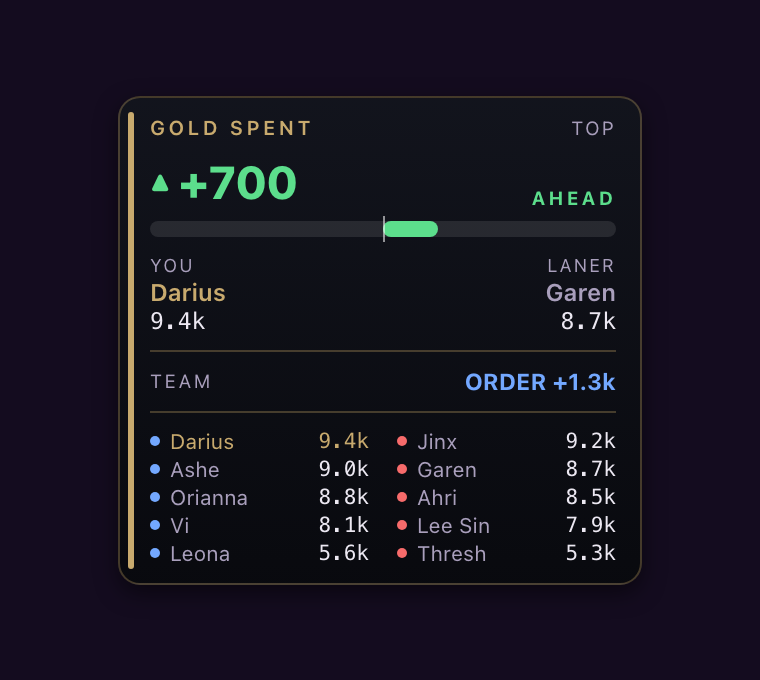
Gold, at a glance
Hold Tab and the lane lead leads: how far ahead of (or behind) your lane opponent you are in gold, with per-champion totals and the team lead below. Release, it's gone.
How it works
Three steps, zero setup.
Open League
Rift Companion finds the client on its own. No login, no API key, no setup.
Lock your champ
Popular runes, build and the matchup read appear as champion select resolves.
Load in
Panels pin to your game. Tab for gold, click to mark summoner spells, play.
Questions
Asked and answered.
Is there a League of Legends overlay for Mac? +
Do League of Legends overlays work on Mac? +
Will this get me banned? +
Does it work with Vanguard on Mac? +
Where does the data come from? +
What permissions does it ask for? +
Does it press keys or play for me? +
Is Rift Companion open source? +
What do I need? +
Lock in smarter.
One quiet companion, built for the Mac client.
Download for MacmacOS 14+ · Apple silicon · Free · v1.0
Read-only by design · No injection, no memory reading · No account